Reading CSV Files
- Adding Apache commons csv library as dependencies
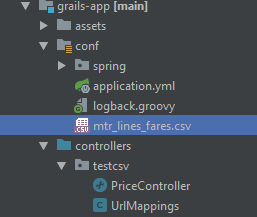
- Putting your csv file in the project
- Read the CSV file in your code
Adding apache commons text library as dependencies
Put the following in your build.gradle dependencies{} section. The current version of commons cvs is 1.6. You might want to use a newer version upon its release.
compile group: 'org.apache.commons', name: 'commons-csv', version: '1.6'
Putting your csv file in the project
For Grails 3 project, one of the good place to store your file is the /grails-app/conf directory. You can even create your own directory within it. We are going to use MTR Lines (except Airport Express & Light Rail) Fares mtr_lines_fares.csv as an example, and it can be downloaded at here.
The data look like the follow. Play attention to the header.
| SRC_STATION_NAME | SRC_STATION_ID | DEST_STATION_NAME | DEST_STATION_ID | OCT_ADT_FARE | OCT_STD_FARE | SINGLE_ADT_FARE | OCT_CON_CHILD_FARE | OCT_CON_ELDERLY_FARE | OCT_CON_PWD_FARE | SINGLE_CON_CHILD_FARE |
|---|---|---|---|---|---|---|---|---|---|---|
| Central | 1 | Central | 1 | 0 | 0 | 0 | 0 | 0 | 0 | 0 |
| Central | 1 | Admiralty | 2 | 4.6 | 3 | 5 | 3 | 2 | 2 | 3 |
| … | ||||||||||
Read the CSV file in your code
We can read the csv in a Grails controller or service. We are going to do this in a controller.
class PriceController {
    def grailsResourceLocator

    def index() {
        String strings = grailsResourceLocator.findResourceForURI('classpath:/mtr_lines_fares.csv').inputStream.getText(StandardCharsets.UTF_8.name())
        Iterable<CSVRecord> records = CSVFormat.RFC4180.withFirstRecordAsHeader().parse(new StringReader(strings))
        StringBuilder sb = new StringBuilder()
        for (CSVRecord cvsRecord : records) {
            try {
                sb.append(cvsRecord.get("SRC_STATION_NAME")).append(", ")
                sb.append(cvsRecord.get("SRC_STATION_ID")).append(", ")
                sb.append(cvsRecord.get("DEST_STATION_NAME")).append(", ")
                sb.append(cvsRecord.get("DEST_STATION_ID")).append(", ")
                sb.append(cvsRecord.get("OCT_ADT_FARE")).append(", ")
                sb.append(cvsRecord.get("OCT_STD_FARE")).append(", ")
                sb.append(cvsRecord.get("SINGLE_ADT_FARE")).append(", ")
                sb.append(cvsRecord.get("OCT_CON_CHILD_FARE")).append(", ")
                sb.append(cvsRecord.get("OCT_CON_ELDERLY_FARE")).append(", ")
                sb.append(cvsRecord.get("OCT_CON_PWD_FARE")).append(", ")
                sb.append(cvsRecord.get("SINGLE_CON_CHILD_FARE")).append(", ")
                sb.append(cvsRecord.get("SINGLE_CON_ELDERLY_FARE"))
                sb.append("<br>")
            } catch (Exception ignored) {
                log.error("Unable to convert ${cvsRecord.toString()}")
            }
        }
        render(sb.toString())
    }
}
First we load our csv file with grailsResourceLocator.
String strings = grailsResourceLocator.findResourceForURI('classpath:/mtr_lines_fares.csv').inputStream.getText(StandardCharsets.UTF_8.name())
Than parse it with withFirstRecordAsHeader. It will return an iterable CSVRecord, which is basically a map with headers as keys.
Iterable<CSVRecord> records = CSVFormat.RFC4180.withFirstRecordAsHeader().parse(new StringReader(strings))
With the iterable records, we can use a loop to loop though them to extract the data we want. Here we use the csv header as the key to obtains data in each column.
for (CSVRecord cvsRecord : records) {
   try {
      sb.append(cvsRecord.get("SRC_STATION_NAME")).append(", ")
      .
      .
      .
   } catch (Exception ignored) {
      log.error("Unable to convert ${cvsRecord.toString()}")
}

CSV without header
You can parse the string with
Iterable<CSVRecord> records = CSVFormat.RFC4180.parse(new StringReader(strings))
And loop though the records with
for (CSVRecord cvsRecord : records) {
   try {
      sb.append(cvsRecord.get(0).append(", ")
      sb.append(cvsRecord.get(1).append(", ")
      sb.append(cvsRecord.get(2).append(", ")
      .
      .
      .
   } catch (Exception ignored) {
      log.error("Unable to convert ${cvsRecord.toString()}")
}